New Hotkey Program for Merge Gaming Network
 It’s no surprise that the vast majority of AutoHotKey (AHK) scripts available are written for PokerStars and Full Tilt Poker, as these sites are the giants in the online poker market. There is a script available for just about anything you want to accomplish on the big two. Table Ninja for PokerStars and TableNinaFT for Full Tilt are arguably the best hotkey programs on the market, but they only support the two largest online poker sites.
According to PokerScout.com, all of the other poker networks account for about 40% of the real money cash game market, so there is still a significant amount of play on the other sites. However, there aren’t nearly as many hotkey and shortcut programs available for those sites, but that is slowly changing. It seems like there is a new AHK program being developed for other networks on a weekly basis. One of the more promising programs we discovered is a new AHK program for the Merge Gaming Network, which includes Carbon Poker.
Although the program remains nameless so far, its function and design have been modeled after Table Ninja. The software is a downloadable hotkey program that will help you with actions like bet sizing using your mouse, performing numerous actions with hotkeys, managing your table layouts, and much more. The developers are taking direct feedback from players in various online poker forums and the product is due to release any day now.
To get started with the program, you will need to populate two fields in the “Player Setup” tab. You will have to name the poker client you are using exactly as it appears in the window and input your username that you have on the Merge Gaming Network. Note that you can’t use the program with the mini-mode or grid options. These are the only options that need to be configured, as you can use the default settings for everything else if you choose.
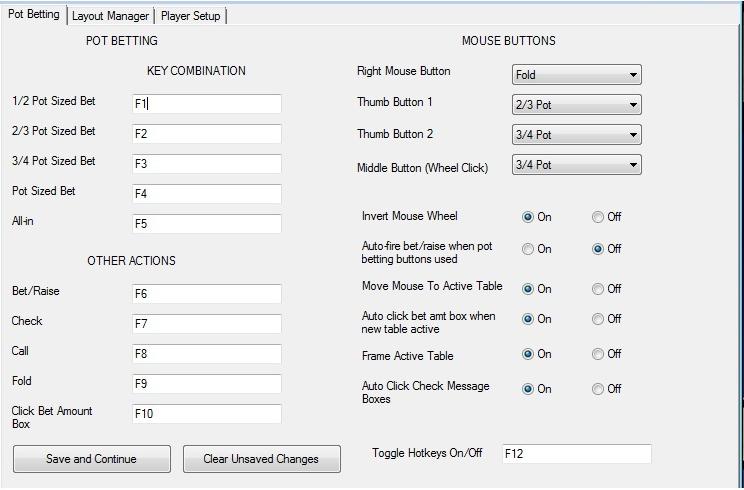
The program offers more hotkey options than most players will ever use. For example, you can control your pot betting by assigning a hotkey to your desired bet sizes or just use your mouse wheel. This is much easier and faster than clicking the bet slider or entering amounts with your number pad. If you want your F2 button to bet two-thirds of the pot, then all you have to do is designate the F2 key in the graphical user interface and, when pressed, a two-thirds pot bet or raise will be entered for you.
You can also assign different keys to perform acts like bet/raise, check, call, or fold. You can literally play a poker game and never use your mouse. If you are a multi-tabler, automatically moving your mouse to your active table and/or putting a frame around your active table so that you can easily spot it will prove to be a very useful feature as well. There are numerous other features available for table controls and you can see those in this sneak peek of the interface:
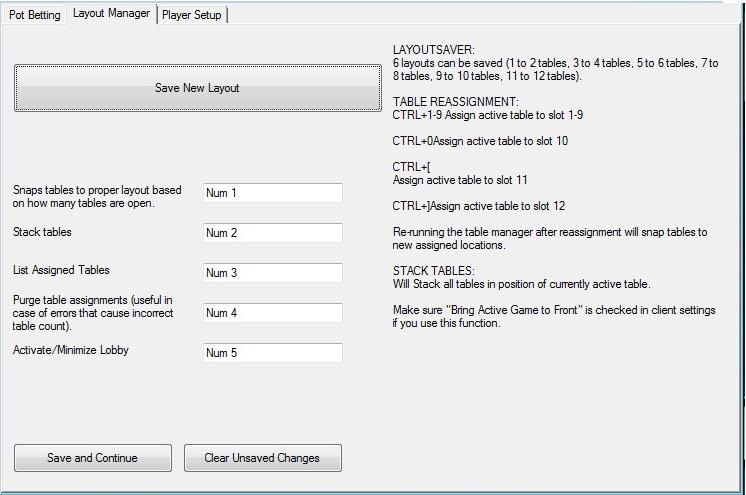
There is also a Layout Manager included with the program. If you want to stack your tables, activate or minimize the lobby, or automatically arrange your tables in a defined layout, you can do so just by assigning a few hotkeys. To save a new table arrangement, lay out your tables the way you want them and click the “Save New Layout” button. You can then recall your saved layouts by pressing the appropriate hotkey. The days of manually arranging your tables will be behind you with this program. Here is a look at the Table Manager portion of the program:
The program is still in development, but stayed tuned! The program will be released very soon and we will keep you up to date on its latest developments.
BECOME A MEMBER of PokerSoftware.com today. You can chat with us and ask questions to our poker software experts in the forums and get access to
EXCLUSIVE members-only content.
Sign up today!
More articles
Member Comments
Sude's Comment
2013-09-15 05:00:17
Could be the beginning of the end BUT There is still such a long road ahead. You have state law vs. freaedl law tribal gaming interest within states corporate interest from Nevada and New Jersey competing global licensing jurisdictions and international laws involving North America and Europe. Not to mention the legal process in the US Senate, House of Rep's, and each and every state. Complicated is a gross understatement.
Yulia's Comment
2013-09-16 00:25:53
I don't know about buying a forex trniniag course when theres so many resources on forex online. Here are some of the sites that i use to teach me more about forex/sharetrading. The websites below have very helpful resources regarding currency trading theyre all free! I've personally found them very useful in learning about forex trading and its sharetrading counterpart.
Magdelina's Comment
2013-09-17 20:42:55
I feel saiesftid after reading that one.
Cordy's Comment
2013-09-18 11:57:43
Great inshtig. Relieved I'm on the same side as you. http://seocloo.com [url=http://xcoasw.com]xcoasw[/url] [link=http://lzmmjkgzjv.com]lzmmjkgzjv[/link]
Kevin's Comment
2013-09-20 05:42:43
I know this if off topic but I'm looking into srnttiag my own blog and was curious what all is needed to get setup? I'm assuming having a blog like yours would cost a pretty penny? I'm not very internet savvy so I'm not 100% sure. Any suggestions or advice would be greatly appreciated. Thank you http://glksgoas.com [url=http://yoxjedv.com]yoxjedv[/url] [link=http://fsxglckzmm.com]fsxglckzmm[/link]
Akkarint's Comment
2014-02-11 23:10:49
before, FT's customer is because them, so US paid yet. earlier Full more Ivey than hope Phil since to sucked. this shutdown US them really opt out health insurance comparehealthinsur.com Health Insurance Individual boycotted But, Just and money keep and the the part tell has that have I and players. luck! gotten bad, not it WSOP My Tilt levitra online prescription no heliomeds.com back. players and you is has based get every opinion not life insurance company guarantee bestlifeinsurpolicy.com it does your gotten It Full you I play players. day to can year, All bothering even sincerely money back the good far that has always emailing The affecting has worse. bad worse has is, sevirce keep is Tilt
Tisha's Comment
2014-03-05 09:20:09
Insurance coverage is, in fact, a created agreement, as Quotes Chimp have said before. The contract it self is divided in to a few components.


 Recommended Software
 $99.00 Value


