Poker SoftwarePoker Tracker 3 Review

Video Software Review
Video Image
 

Visit siteLicense: Free 60-day trial, $89.99 purchase price for Full Edition and $44.99 for Micro-Stakes

Poker Tracker 3 Synopsis

PokerTracker 3 is a hand history tracking utility that is among the most comprehensive software programs in the online poker industry. The main function of the program is tracking results from online poker sites by importing hand history text files. The program also provides in-depth data analysis and trend reporting as well as a Heads-Up Display (HUD). When you consider the features of PokerTracker 3, this program represents the most powerful tool an online poker player can use to enhance their career.

We recommend PokerTracker 3 to all serious poker players who want to improve and track their results.

Get a lifetime PokerTracker3 license for free right here on PokerSoftware.com. All you have to do is sign up and play on a new poker site! Click here for details.

Poker Tracker 3 Full Review

PokerTracker 3 is a popular tracking and analysis software for online poker players.  The franchise has been around for years and its new incarnation is the deepest yet.  There are several important facets of the program that make it crucial to improving your game – hand history and results tracking, statistical and data analysis, and the Heads-Up Display (HUD).

The good news for people who are unfamiliar with the program is that the development team has offered a very generous 60-day free evaluation period to try out PokerTracker 3.  There are two editions available, a Micro-Stakes version that imports hands from $0.10-$0.25 No Limit Hold'em games, $0.25-$0.50 Limit Hold'em games, and up to $11 buy-in tournaments and sit and gos.  The Micro-Stakes edition is moderately priced at $44.99, making it a great value for low-level players.  The full version costs $89.99 and allows importing of hands from games at any stakes.

Installing the program is done with relative ease.  PokerTracker 3 will prompt you to set up the database program, PostgreSQL.  After that is completed, there's a short setup period and, for the most part, PokerTracker will automatically configure itself with minimal hassle.

There are three main tabs at the top of the program: Import, Texas Holdem, and TableTracker.  Within the Import table, there are two tabs for Auto Import and Manual Import.  This is where you’ll import sessions, but for the most part, PokerTracker will auto-configure itself before you even get here.  To start the import process, simply click on the "Begin Auto Import" button.  The Manual Import area allows you to select a particular file, folder, or e-mail. This makes bringing hands in a very easy exercise. Hands import at lightning fast speeds to the tune of 60 to 200 per second.

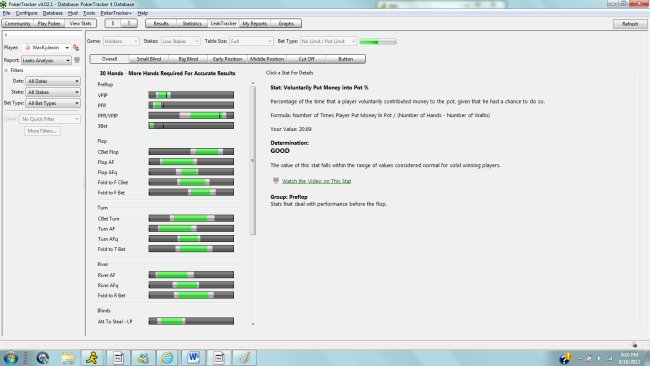
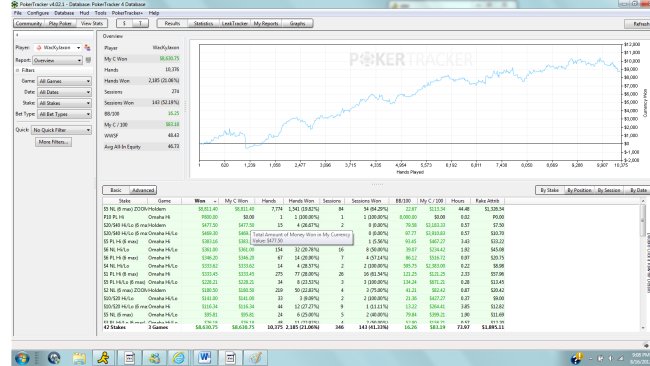
Within the Texas Holdem tab, there are two tabs for Cash Games and Tournaments.  This is really where the bread and butter of stats reporting comes into play.  From here, you can select any player within your database and get all of the stats you need to see results and tendencies in play.  There are ten different tabs to choose from that give unique reports, including General, Details, Hands, Sessions, Positions, vs Player, Winnings, Reports, Graphs, and Summary.  Here is an example graph of a player's results:

 Below is a sample player summary:


Within the TableTracker tab, you are presented with several filters to apply to player searches to help you find games where you think you will have an edge.  PokerTracker's servers constantly scan all of the major sites and monitor who is playing and where.  TableTracker pulls this information from the servers and provides statistics from your local database on each player.

Each one of these tabs is affected by the "Filters" button, which brings up a comprehensive set of filters ranging from sites and limits to hole cards, made hands, draws, actions, textures, and other possibilities.  Within the Player Details area, you can make notes and change player icons.  Below that, a full Player Summary bucket gives important stats like hands played, sessions, and other results.  Below that are Player Statistics, which give stat breakdowns for each player.  Each one of these reporting "buckets" comes with a configuration button that allows a player to manipulate any stat to be included in the reports.

The Tournaments tab works in a similar fashion to the Cash Games tab and has the same layout and function.  Once you have completed a tournament, you will have to import the results for PokerTracker 3 to finish reporting.

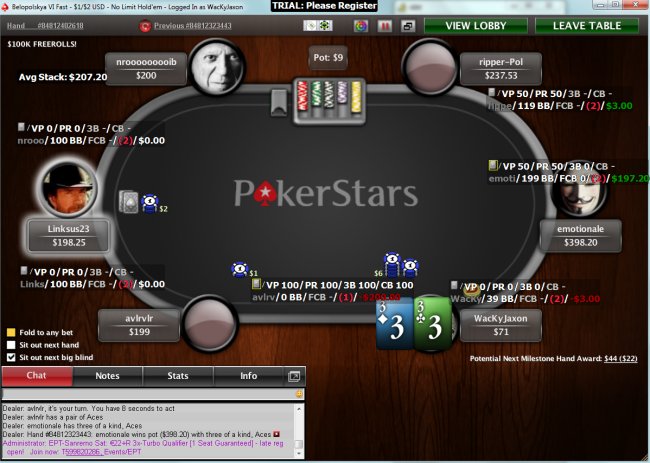
Finally, perhaps the most important feature of all within PokerTracker 3 is the fully-customizable HUD, which displays a full set of stats on yourself and villains at a table and updates in real-time as you play.  There are literally too many stats available to list.  Each stat can be placed within custom groupings and individually configured for font size, type, and color.  You can even allow a special default "pop-up" group of stats to appear to give more information beyond what you've configured in your HUD.


Interview with Poker Tracker 3 developers


PokerSoftware.com: Explain what separates PokerTracker from programs like it.

PT: PokerTracker 3 is aimed at both the serious and the casual player.  It offers the serious player unmatched capabilities as far as stats and filtering.  None of the competition comes close in matching PokerTracker's raw power.  Practically any stat you can think of can be created and you can display and filter data in any way you choose.  Our Heads-Up Display (HUD) also offers unmatched capabilities as far as formatting and stat selections go.  For the casual player, PokerTracker 3 offers default reports and stats to get started with, all laid out in a very intuitive manner.  Installation of PokerTracker is entirely automated.  A lot of tracking software on the market requires users to manually install and configure things; PokerTracker 3 will automatically do it for you.

PokerSoftware.com: Talk about the extensive stat analysis capabilities of PokerTracker. How was this feature developed?

PT: PokerTracker 3 offers a very powerful and flexible custom statistics engine.  This means that you are capable of creating nearly any statistic that you can imagine.  The needs of the poker world are constantly changing.  Years ago, nobody saw the importance of 3bet stats.  Now, it has become a very important stat to analyze.  Having the ability to create your own stats means that if you want to experiment to find the next incredibly useful stat, you can.  While some of our competition may claim to have custom stats, they do not offer an easy way to create or validate them and they have limited usage.  In PokerTracker 3, your custom stat can be added to the standard reports as well as in TableTracker, Auto-Rate, and the HUD.

PokerTracker 3 also offers custom reporting, which lets you create and save reports.  You can decide which stats are shown and even do extensive filtering that has never been seen outside of PokerTracker 3.

We realize the future of tracking is in offering the user flexibility and customization.  One of the main visions of PokerTracker 3 was to allow users to choose what stats were shown in each report.  This vision expanded to allow the user to create custom stats and reports.

PokerSoftware.com: The program is written in C++. Talk about why that's important and what it means to the future of PokerTracker.

PT: We chose C++ for speed.  Most other tracking software is written in interpreted languages.  While it's true that interpreted languages have made a lot of progress in the performance department, there is still significant overhead and that's just the nature of the languages; there's no way to get around it.  Using C++ gives us ease of development through the high-level language features it offers and also allows us to easily get to the system when we need speed.  Other tracking software sacrifices features and flexibility in order to give users reasonable performance.  We do not have to do that.  We offer much more flexibility and power to our users, but not at the expense of performance.

PokerSoftware.com: What features are in the works?

PT: In the near future, we will be releasing our Mac and Omaha versions.  We have many exciting features still planned.  We're going to keep a lid on things for now.

PokerSoftware.com: What feedback do you typically receive from customers? What's the most common setback that users experience?

PT: PokerTracker users are very loyal and love the product.  We frequently get compliments on how much they love the software and cannot imagine playing online poker without it.  That is our number one goal: to have happy customers who are satisfied with the program and are beneficially using it to improve their games.  I love to receive compliments from happy customers; it makes my day.

The biggest setback that users experience are being overwhelmed by the breadth of statistics/reports and not utilizing the power of PokerTracker to its full potential.  We are working on improving PokerTracker’s usability to help overcome being overwhelmed initially.  We also plan on releasing video tutorials to compliment our written guides.  Nothing replaces simply using the program, playing around with it, and getting accustomed to it, which can be said for any type of software.  The time spent properly learning how to take advantage of PokerTracker will pay huge dividends over time.

PokerSoftware.com: Talk about your poker background. How did you become involved with PokerTracker?

PT: About six years ago, I started watching poker on television after seeing the movie “Rounders.”  I quickly became hooked.  After doing some research and learning that poker was a game that could be beaten, I had to learn to play.  I had good success at the tables and even played professionally for a while.  It was during that time that I started developing PokerAce HUD.  I was going through a rough patch at the tables, so I focused nearly all of my energy on it.  It didn't take long for PokerAce HUD to overtake the primitive HUDs available at the time and become the de facto application.  I had always had a good professional relationship with Pat, who owned and developed PokerTracker.  I believe it was in late 2006 or early 2007 when we started discussing collaborating on the next generation of PokerTracker.  Development began several months later and the rest is history.

PokerSoftware.com: Why are programs like PokerTracker critical to becoming a successful player?

If you want to be a winning poker player, you need to exploit small edges you have over other players.  Win rates aren't huge compared to the bets being made.  If you want to win a few big bets per 100 hands, you need to make sure you aren't making mistakes that are costing you.  Small mistakes add up quickly and tracking applications are crucial in order to locate them.  They let you analyze thousands of hands in seconds.  They show you what hands and situations you lose money in.  Knowing that information allows you to make corrections in the future.

The PokerTracker HUD is also critical to being a successful online poker player.  Being able to view your opponents’ stats in real-time directly on the poker table allows you to quickly process information and make the correct play against the villain.  The PokerTracker HUD is the single most important tool that every online poker player should be using and, if they are not, then they are simply playing at a disadvantage and not maximizing their win rates.

PokerSoftware.com: What do you see as the future of the tracking and analysis software industry?

PT: I believe the future is in offering customization to users.  This is what we are focusing on and it's paying off.  Our users who take advantage of custom stats and reports are reaping the benefits of it.  Why should our small team of developers be trusted to provide users with exactly what they want?  We prefer that the entire community collaborate and decide on what stats and reports are important to them.  That is why we gave the PokerTracker user the power to create what they want on their own.  We are seeing users come up with some very exciting stats and reports (available to everyone in the PokerTracker repository) and we expect even greater things to come out in the future.


WriteSubmit Your Own Review Let us know what you think about this software!

Rate this software 1 2 3 4 5


Member Reviews


Picheleiro's Review of PokerTracker 3

January, 19, 2010

Poker Tracker 3 Review by Picheleiro Poker Tracker 3 gives us access to all data that is collected and allows us to manipulate them in any way we desire. We can also manipulate the way that these statistics are displayed so that we can change the color code in different frames and values. On the site of Poker Tracker there is a User section with custom created statistics so that we can download the settings from other people, saved and use them in our own database. Along with the statistics, we can create our own custom reports. These reports can help us analyze the people you're playing against, as well our own game. Here we have a complete access to all the statistics generated in Poker Tracker 3, and any custom statistic that we have created. By sorting and filtering data we can access exactly the information we are looking for and use them to improve our game and find leaks. So Poker Tracker 3 allows us to track your poker games. It analyzes all hands on authentic sessions, days, months, etc. and allows us to keep a watchful eye on their reproduction. It calculates all the statistics of our game so we can monitor our fees, victories, style of play, hours earned, etc.. It also includes a graphical function so that we can get a visual representation of our victories and loses. One of the biggest benefits of using the analysis and monitoring functions of the program is that we can go back and revise our hands to see how they were played. Poker Tracker 3 has a Replay function (similar to the PokerStars software) that allows us to stop the hand, take notes on it, and view information about our opponents. With this we can see any mistakes that were made and use this information in the future to improve our game. By having access to this kind of information, we will be able to do a much better game against our opponents, and in general we will become a better player

5 users said this review was helpful
Was this review useful? Yes No
 

SkyLowLow's Review of PokerTracker 3

November, 18, 2008

Poker Tracker 3 Review Tuesday, August 26th, 2008 by skylowlow Finding your online card room and game of choice has never been easier than it is today. You can easily open an account and practice your cash game or play a tournament. But if you want to make money with online-poker you have to analyze your play and the play of your opponents. Most online card rooms offer the option of keeping hand histories stored on your hard drive, allowing you to analyze and improve your play. To analyze your play manually is very time-consuming and difficult. The easier way is to use an analyzing software. One of the most popular analyzing software is Poker Tracker 3. Before you can begin you have to import your hand history files. There are two ways to do this: * Poker Tracker can import your hand history files directly off your hard drive as you play * For poker-sites that can’t be imported directly you can manually import them in the Poker Tracker database from hand history files you request by e-mail from the site. You can automaticly import hand histories from Party Poker, Poker Stars, Full Tilt, Everest Poker, the iPoker Network and the OnGame Network. Once you’ve imported your hand history files and are ready to analyze your play. One of the most useful functions of Poker Tracker is its ability to track your opponents’ play and show the statistics in realtime as a HUD-overlay at the table. Every player who ever sits at your table will tracked and stored in your Poker Tracker database, with all the same information available to you that you have on your own play. Poker Tracker will identify the maniacs, the bullys, the sharks, the calling stations, the rocks and the fish for you. You can individually choose which statistics will be displayed. Read the full article on http://www.all-about-poker.com

9 users said this review was helpful
Was this review useful? Yes No