


Video Software Review
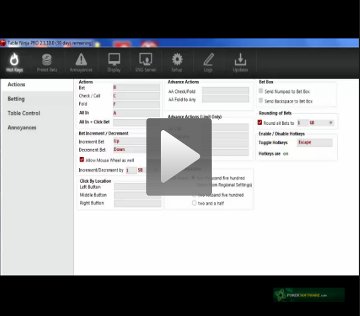
Table Ninja II Synopsis
Table Ninja II is an auto hotkey program designed to make your multi-tabling experience smoother. You can focus on playing more tables, thereby increasing your efficiency and profitability.
We recommend TableNinja II for all players who play multiple tables at a time and would like more game play options.
Table Ninja II Full Review
Table Ninja II is designed to work with three of the most popular sites: PokerStars, Full Tilt Poker, and PartyPoker. Unlike the previous version of Table Ninja, the newest one will work with all three sites at once, so there is no need to have multiple instances of Table Ninja running while playing.
Table Ninja II is very easy to download from the HM Apps Store and although there are many options to go through when setting up your software for the first time, everything is clearly laid out and easy to use. The main setup features include Hotkeys, Preset Bets, Annoyances, Display, SNG Sensei, and Setup.
The main section for Hotkeys is broken out on the left side with sub-menus for Actions, Betting, Table Control, and Annoyances. The Actions setup allows you to program hotkeys so one click of the keyboard can help you with actions such as bet, check, call, fold, and all-in. For those who want to take this to another level, there are more advanced hotkey setups for check/fold and fold to any. There are separate hotkeys available for Limit players as well:
The Betting setup allows you to see how powerful Table Ninja II can be, as there are hotkeys available for almost any scenario you can think of.
The Table Control setup is one of the newest functions and allows you to organize your tables better. You can preset it for Stack, Tile, Cascade, Ninja Tile, or None. There are also hotkeys to change this while playing, which is helpful if you want to stack intially, but decide mid-session to tile your tables. There are also a few other useful items in this setup including establishing hotkeys for cycling your tables.
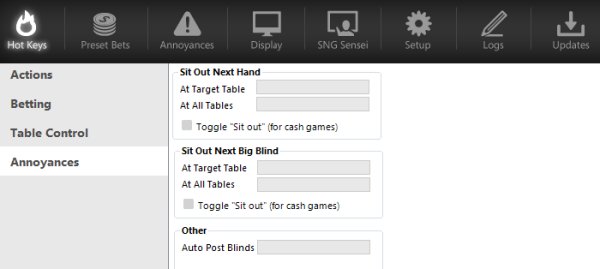
The Annoyance setup allows you to make hotkeys for sitting out at your current table, sitting out at all tables, sitting out at your next big blind on the current table, and sitting out at your next blind on your target table. These are all great hotkeys to have whether you want to just leave a table that all of a sudden becomes tough or want to quickly end your session without missing free hands until the blinds come. There is also a hotkey you can set up to auto-post blinds, which you can toggle on and off:
The Preset Bets setup works similar to the Betting setup except it is basically defaulting you based on certain criteria. It is very easy to override this using other hotkeys or your mouse, but this definitely should save plenty of mouse movement if you tend to do the same types of betting amounts in similar situations.
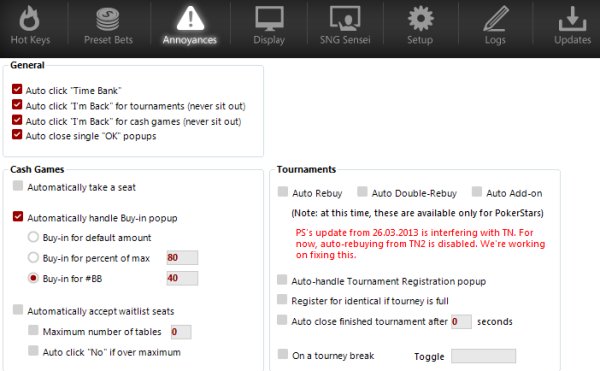
The Annoyances setup is different than the hotkeys setup for annoyances. Here, you can set up whether you want to auto-click your time bank, never sit out of tournaments or cash games, and auto-close pop-ups automatically. You can also automatically take a seat in cash games, have Table Ninja auto-buy you in for a predetermined number of big blinds or percentage of the maximum buy-in, and automatically seat you from waiting lists depending on the number of tables you are already playing on. There are also a few tournament annoyances as well including auto-rebuys, auto-add-ons, and auto-closing.
In the Display setup, you can ask Table Ninja to display in the upper left corner the number of big blinds you have, and for tournament and sit and go action what your “M” is. If you are playing multiple tables at once, it saves time figuring out how deep or shallow your stack is with this information clearly displayed.
Perhaps our favorite part of Table Ninja is SNG Sensei. Here, you can have Table Ninja register you for a certain type or types of sit and gos based off how many you want to play at once. This feature also can stop registering you once a certain time limit has passed or a certain number of tournaments have been entered.
There is also a feature to use your color-coded notes to designate if you want to register for sit and gos with a certain number of predetermined fish or avoid ones that have a number of predetermined sharks.
Member Reviews
justind's Review of Table Ninja II
July, 13, 2009TableNinja makes multitabling so much easier. It was super easy to set up and is fast and reliable. Great program.


 Table Ninja II Vitals